
WhatsApp to serve and coordinate your business.
An assistant replies on your WhatsApp Business number: it answers the questions you configure, coordinates appointments if you have the Darcemi calendar, and hands you the conversation when a person is needed. Fixed rules decide what it can do; AI only interprets what's being asked.
To answer questions and hand conversations to you, all it needs is your WhatsApp Business number connected to Darcemi. To book, reschedule or cancel appointments it needs the scheduling and booking calendar with your services and hours; if you want it, it goes in the same proposal.
We're a Tech Provider verified by Meta for WhatsApp Business.
Meta has verified our business and approved us as a technology provider to connect other businesses' WhatsApp Business accounts. For you, this means:
- You connect your own number from the Darcemi panel through Meta's official sign-up, without copying keys or credentials.
- Your WhatsApp Business account stays in your business's name, and Meta bills its messages to you.
- Meta authorizes us to manage the connection and message templates on your behalf: we register the reminder templates and follow their approval.
It's the verification Meta requires to connect other businesses' WhatsApp Business accounts; it isn't an endorsement by Meta of Darcemi or its other services.
Every action, with its requirement.
The assistant only does what's enabled in your account. This is what it can do today, and what each action needs.
| Action | Requires |
|---|---|
| Answer your frequently asked questions, opening hours and address. | The questions and answers you configure in the panel. |
| Book, reschedule and cancel appointments with real availability. | Scheduling and booking. |
| Tell your client when their next appointment is. | Scheduling and booking. |
| Send a reminder before the appointment, with the option to confirm, reschedule or cancel. | Scheduling and booking, and message templates approved by Meta on your account. |
| Send a follow-up after the appointment, with a link to your Google reviews if you provide one. | Scheduling and booking. |
| Offer a freed-up slot to whoever is on the waiting list. | Scheduling and booking. |
| Hand the conversation to someone on your team. | Nothing else: your team replies from the panel. |
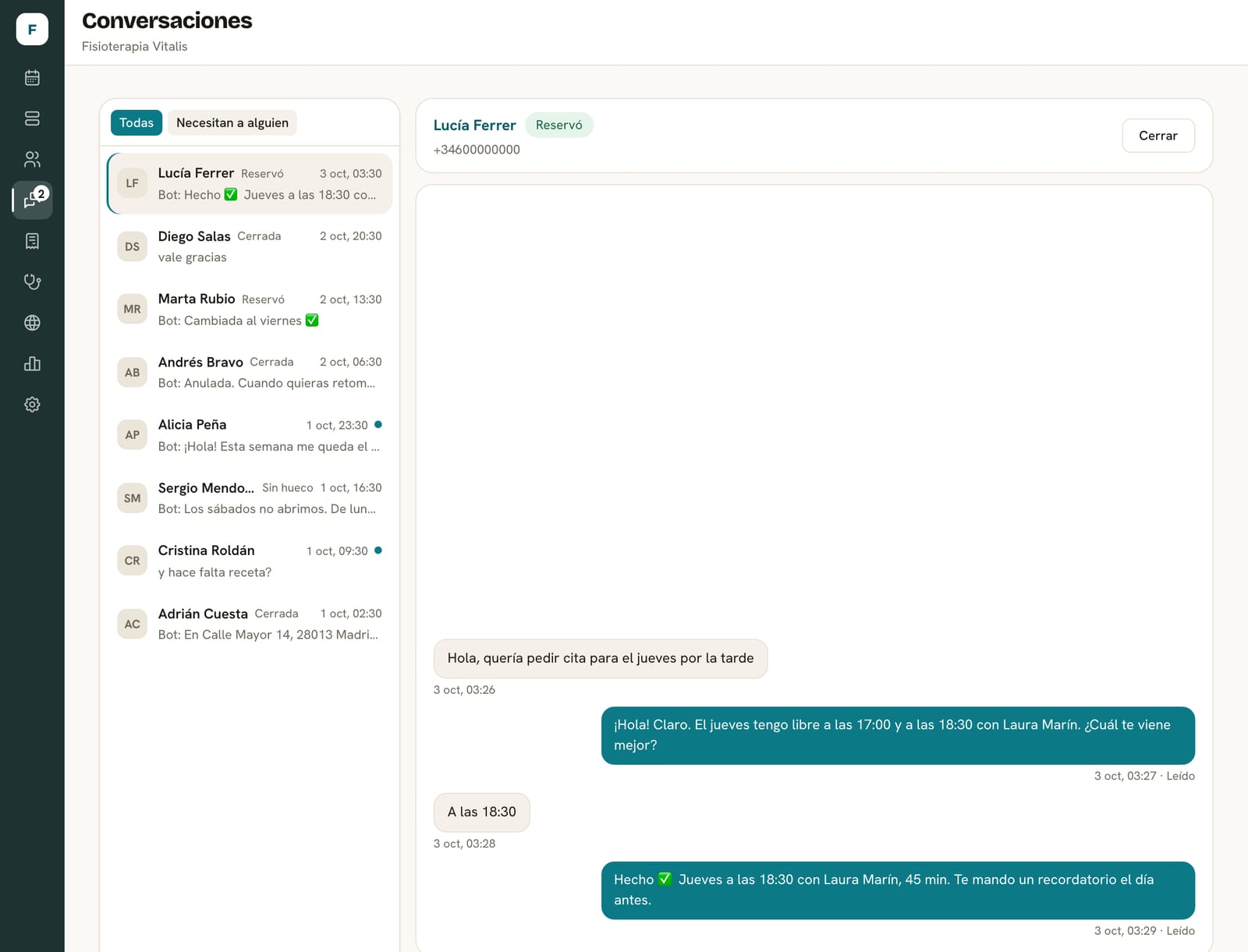
When your client asks for it, or when the request isn't something the assistant has enabled, the conversation goes to your team. You pick it up from the Conversations screen in the panel and, when you're done, hand it back to the assistant.
A language model interprets what each message is asking for: to book, reschedule, cancel or ask something. Slots, booking rules and answers come from your data and from Darcemi's fixed rules, not from the AI.
From the first message to the confirmed appointment.
This is how it works when the assistant has the scheduling and booking calendar. Without it, it answers questions and hands the conversation to you.

A request comes in through the business's channel
Every request is logged in the same place, with its source channel and time, without depending on someone being free to handle it.
Conversations, in your panel
What you get
The assistant, the connection to your number and the screen your team works from.
What's included
- Connecting your WhatsApp Business number to Darcemi from the panel itself.
- The assistant, configured with your frequently asked questions and your business details.
- The Conversations screen: every chat, the handover to your team and the return to the assistant.
- A simulator in the panel to test the replies before opening it to your clients.
- WhatsApp reminders and follow-ups, if you have the Darcemi calendar.
What's not included
- Issuing invoices or taking payments on WhatsApp: invoices are sent from the panel.
- Other channels, such as Instagram, phone calls or email.
- Marketing campaigns or bulk messaging.
- Diagnosis or professional advice: the assistant doesn't replace your team.
What you need to get started
- A phone number for WhatsApp Business and a Meta account in your business's name, which is where Meta bills you for messages.
- Your frequently asked questions and the details it should give: hours, address, services.
- To coordinate appointments, the Darcemi calendar with services, professionals and hours.
How we set it up
We review your conversations
What people ask you, what you want the assistant to handle and what should always go to a person.
We connect your number
You connect your number from the panel through Meta's official sign-up, without copying keys or credentials. Your WhatsApp Business account stays in your business's name.
We configure and test
Frequently asked questions and, if it will book, services and hours. We test it in the simulator.
You open it to clients
Your team handles whatever the assistant passes on from Conversations.
What we need from you
- The number and access to your business's Meta account to connect it.
- What your clients ask you and how you want to answer.
- Who on your team will handle the conversations that go to a person.
Connections
What the assistant uses and what can be added.
- IncludedMeta's WhatsApp Business
The official WhatsApp Business API, with your own account connected from the panel. Messages are a Meta cost, separate, at Meta's rates: Meta bills them directly to your WhatsApp Business account, not through Darcemi.
- IncludedAI message interpretation
A language model from Groq classifies what each message is asking for. It doesn't decide availability or rules: Darcemi does that with your data.
- OptionalScheduling and booking
Needed for the assistant to check real availability and book, reschedule or cancel appointments, and for reminders.
- OptionalGoogle Calendar
With scheduling and booking: whatever your team has busy in Google Calendar blocks the slots the assistant offers.
How the price is calculated
We give you the price in writing in the proposal, broken down into these items.
- Setup
Connecting the number, configuring the replies and testing in the simulator.
- Monthly fee
What you pay each month for the assistant, conversations in the panel and the agreed support.
- External costs
WhatsApp messages: a Meta cost, separate, at Meta's rates. Meta bills them directly to your WhatsApp Business account.
- Add-ons
The calendar for booking, reminders or Google Calendar are agreed with their own setup.
Frequently asked questions
Does the assistant say whatever it wants?
No. It only does what's enabled in your account. AI interprets what the message asks; slots, bookings and answers come from your data and fixed rules.
Can I step into a conversation?
Yes. From the Conversations screen you reply yourself and, when you're done, hand it back to the assistant.
Do my clients need to install anything?
No. They message your WhatsApp number as always.
Do I need a new number?
You need a number registered on WhatsApp Business with Meta. During setup we check with you whether you can use the one you already have.
Who charges me for WhatsApp messages?
Meta, directly on your WhatsApp Business account and according to its published pricing. It's a cost separate from what you pay Darcemi, and it doesn't go through us.
What happens to reminders if Meta hasn't approved the templates?
More than 24 hours after your client's last message, WhatsApp only allows writing with templates approved by Meta. Until they're approved on your account, the reminder only arrives if your client has written to you within that window.
Tell us what people ask you on WhatsApp.
We review your conversations and tell you what the assistant can handle and what it needs.