
Manage your business's appointments, clients and team.
A calendar with each professional's real availability, every client's record and your team's hours in the same panel. Your clients book on your online booking page and, if you add it, on WhatsApp.
The demo opens the panel of a fictional business with demo data.
Calendar, clients, team and online booking work without anything else. The WhatsApp assistant and a custom website are optional add-ons: if you want them, we explain what they add and what they cost.
“I need an appointment this week in the afternoon”

Your team's calendar
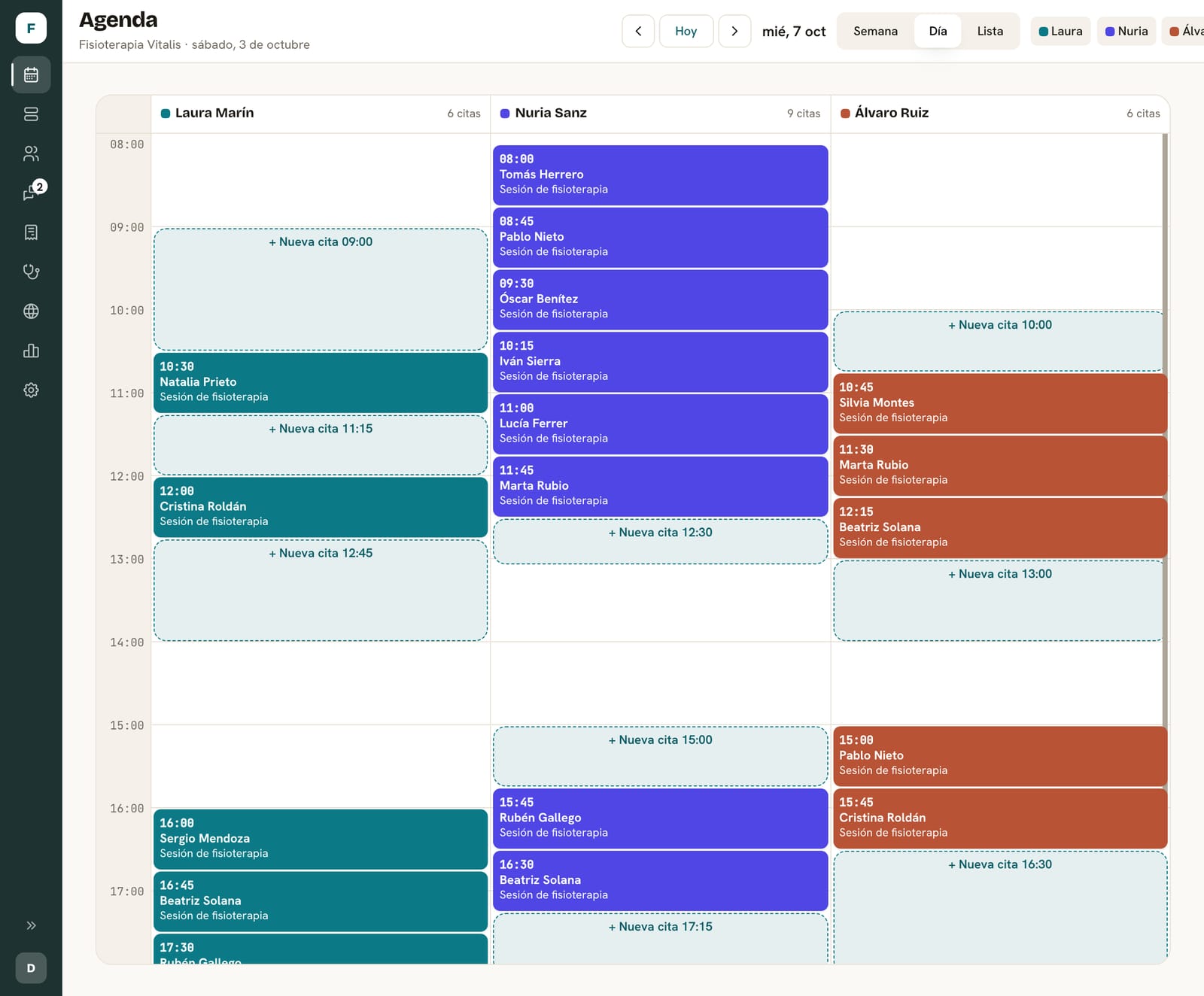
Calendar, clients and team in the same panel.
What happens in one shows up in the rest. The parts marked as optional need the WhatsApp assistant.
Calendar and availability
Real availability per professional, service and duration. Weekly view or day lanes, with the status of every appointment at a glance.
Clients
A record with their appointment history, session notes and usual professional.
Team and professionals
Their own hours, each professional's services and appointments spread according to each person's workload.
Confirmations and reminders
A WhatsApp notice before the appointment, with the option to confirm, reschedule or cancel.
- Appointment created
- Confirmation sent
- Reminder scheduled
- Change requested
Waiting list
If someone cancels, the slot is offered in turn to whoever is waiting.
Connections
The channels and tools that connect to the calendar today.
Any other connection is assessed in the proposal before committing to it.
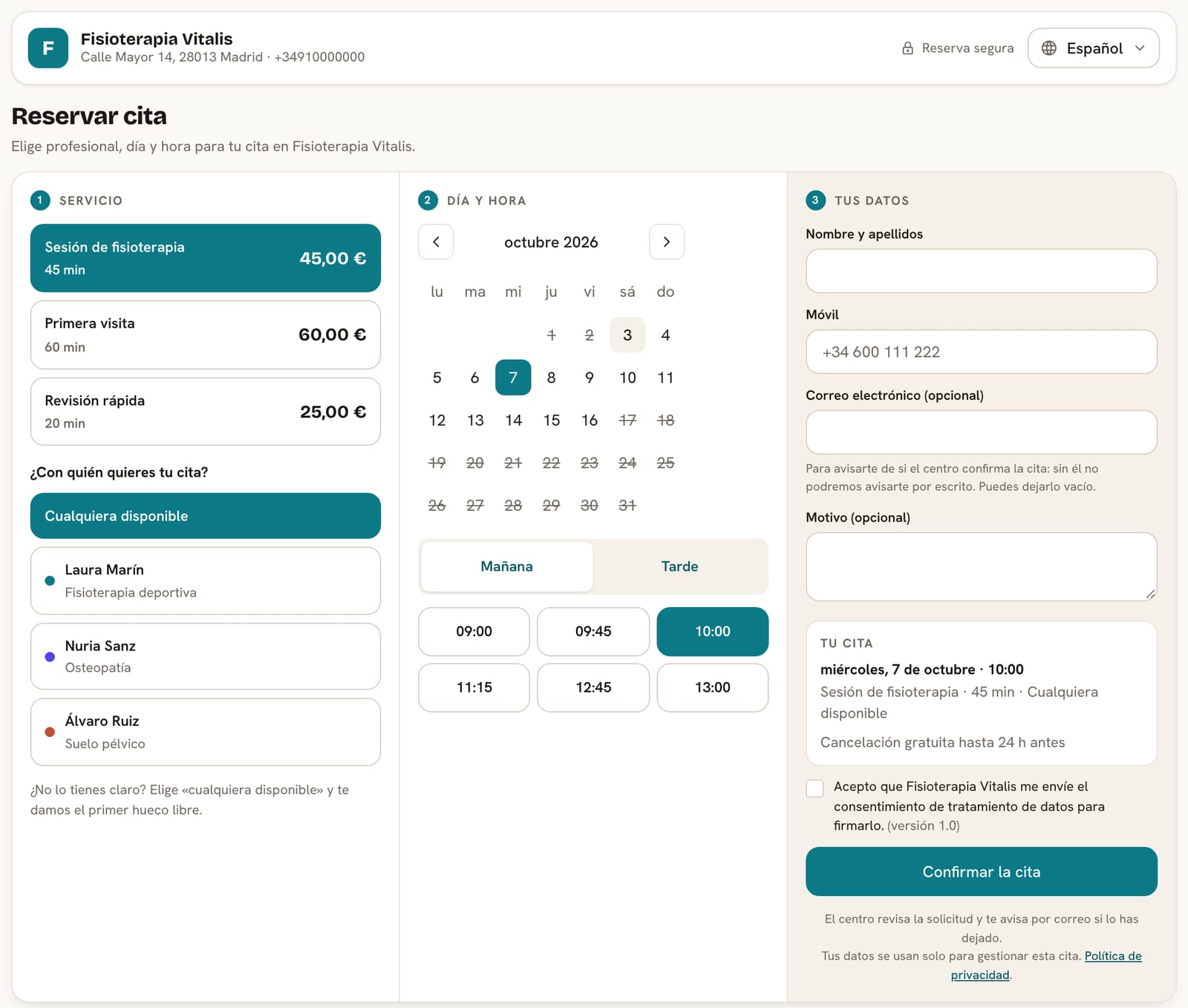
Your clients pick an available slot from your website.
Online booking is the public face of your calendar, not a separate product: it shows the same availability you see in the panel. It requires this booking system enabled and, if you have a website, we connect it.
Service and professional
They choose what they want and with whom, or “anyone”. Only professionals who offer that service are listed.
Day and time
A calendar of the coming days with truly free slots, morning or afternoon.
Their details
Name, mobile and, optionally, email and reason, with their consent.
Confirmed or pending
You decide: the appointment is confirmed straight away, or stays as a request until you approve it from the panel.
It's published at your business's Darcemi address (yourbusiness.darcemi.com). Your clients can cancel the appointment from their own link.
How different businesses use it.
Recurring sessions with the same professional
Multi-session treatments, always with the same person when possible, and reminders before every visit.
If a session is cancelled, the slot is offered again to whoever is waiting.
The assistant uses this same calendar to book, reschedule and cancel appointments, and for reminders.
See the WhatsApp assistantWhat you get
The calendar and everything around it, as it works today.
What's included
- Your team's calendar with each appointment's status and free slots one click away.
- Real availability: working hours, absences, public holidays and each service's duration.
- Client records with appointment history, session notes and usual professional.
- A team with their own hours and the services each professional offers.
- Online booking on your Darcemi page, with the same availability.
- Data protection consents your client signs from a link.
- Reports on occupancy, no-shows, cancellations and new versus returning clients.
- Export your data as CSV whenever you want.
What's not included
- Full clinical records: the record keeps session notes and doesn't replace clinical software.
- Several locations in one account: each has its own.
- Shared resources (rooms, booths, bays) or capacity per time slot: each appointment takes a professional's calendar.
- Staff shift planning.
- Email reminders: reminders go out on WhatsApp.
- Full garage management, such as repair orders or parts.
What you need to get started
- Your services, with their duration and price.
- Your team and each person's hours.
- If you're coming from another program, your data so we can bring it in.
How we set it up
We review your calendar
How you book today, your services, your team and where your bookings come from.
We configure the panel
Services, professionals, hours and booking rules, starting from a template for your type of business.
We bring in your data
From DocFav: clients, team, services and upcoming appointments. From other programs: your clients via CSV.
We open booking
We switch on your booking page and, if you contract them, the assistant and reminders.
What we need from you
- Your list of services, durations and prices.
- Your team and their hours.
- Whether online bookings confirm automatically, or who will approve them.
Connections
What comes with the calendar and what you can add.
- IncludedOnline booking
Your booking page at yourbusiness.darcemi.com, with your calendar's availability.
- OptionalGoogle Calendar
Appointments are copied to a Google calendar for each professional, and whatever they have busy there blocks the slots offered.
- OptionalWhatsApp assistant
Bookings, changes, cancellations, reminders and the waiting list on WhatsApp.
- OptionalImport from DocFav
A one-off migration of clients, team, services and upcoming appointments. It isn't an ongoing sync.
- OptionalInvoicing
You charge each appointment and issue its VeriFactu invoice from the same calendar.
- OptionalCustom website
Your business's own website, leading to your online booking.
How the price is calculated
We give you the price in writing in the proposal, broken down into these items.
- Setup
Configuring services, team and hours, and migrating your data if you're coming from another program.
- Monthly fee
What you pay each month for the panel, online booking and the agreed support.
- External costs
None for the calendar itself. Add-ons that use external providers, such as WhatsApp, carry their own cost.
- Add-ons
The WhatsApp assistant, Google Calendar, invoicing or a website are agreed separately.
Frequently asked questions
Do my clients need to install anything?
No. They book from your booking page in the browser or, if you have the assistant, by messaging your WhatsApp.
Does it work with several professionals?
Yes. Each professional has their own hours, services and calendar. When proposing slots it considers the client's usual professional, who saw them last and the team's workload.
Is it for businesses other than clinics?
Yes, for businesses that work by appointment. What it doesn't do is manage shared resources or each sector's own processes, such as full clinical records or a garage's repair orders.
Can I manage several locations?
Today each account is one location. If you have several, each gets its own account and address, and the same person can access all of them.
Can I try it first?
Yes. The public demo opens the panel of a fictional business with demo data, no sign-up needed.
Tell us how you organize your calendar.
We review how you book today and tell you what's needed to start with Darcemi.