
Invoicing with VeriFactu for your business.
You issue and manage your invoices from the Darcemi panel, and each invoice is recorded and sent to the Spanish Tax Agency (AEAT) under the VeriFactu scheme. You can contract it on its own: we agree the setup, the scope and the connections you need with you.
You don't need to use the calendar or the assistant: you work in the sales section of the Darcemi panel. It's our own invoicing software, not a connection to another program you already use.
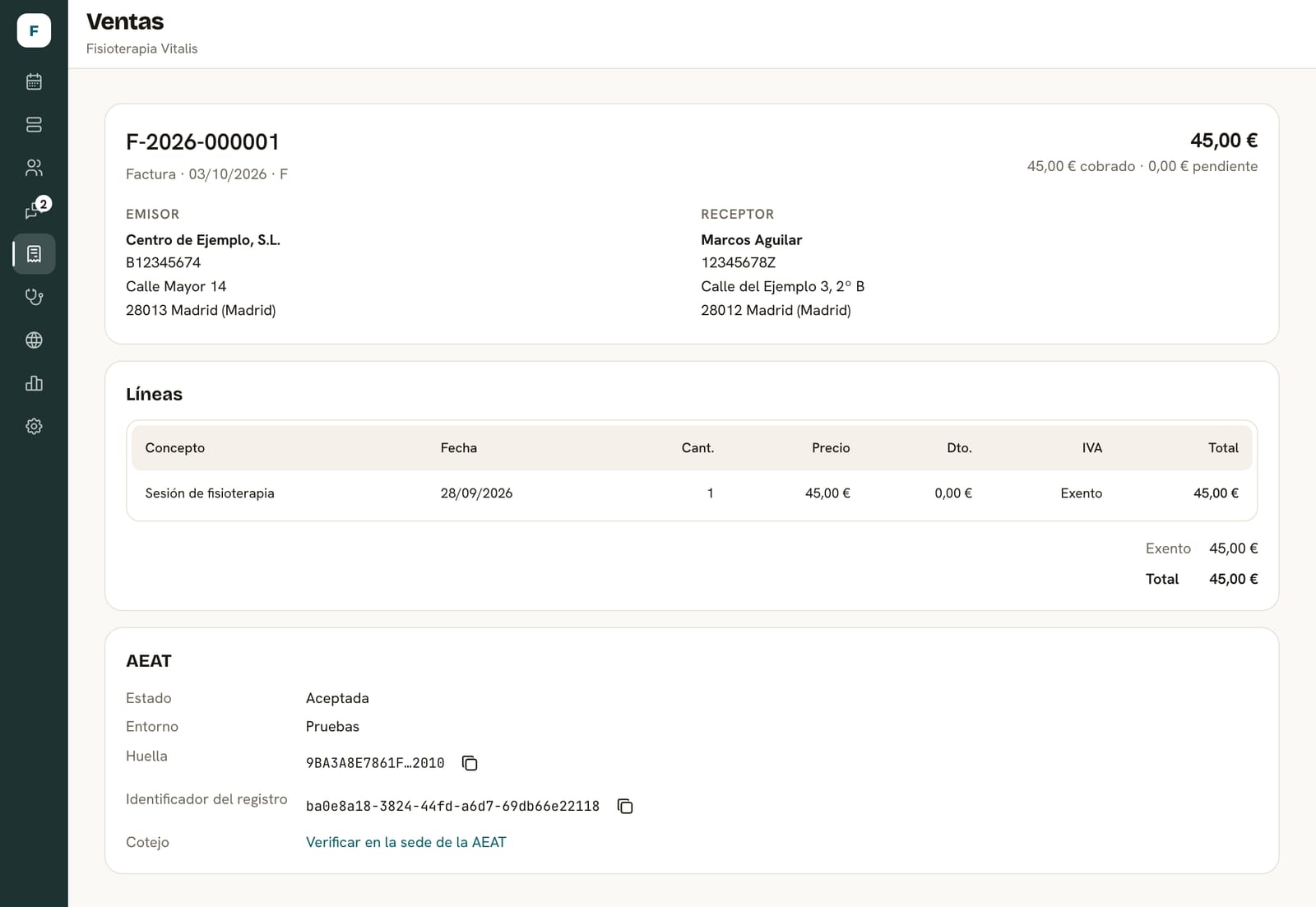
Every invoice, with its AEAT record
The invoice and its submission to the AEAT are on the same screen: no need to open another program to know whether it was recorded.
What you get
An invoicing program inside the Darcemi panel. These are its parts as they work today.
What's included
- Series of full, simplified and corrective invoices, numbered consecutively.
- Corrective invoices by replacement or by difference, and voiding with a reason.
- VAT per line, exemptions such as the healthcare one, and income tax withholding (IRPF).
- A PDF for each invoice with its QR code, sent to the client by email from the panel.
- Quotes with a link so your client can accept or reject them.
- Payment receipts, which are not invoices, in A4 or for receipt printers.
- Cash closing and an expense ledger with receipts.
- Excel and PDF exports for your accountant.
- Several tax issuers in the same account, if you need them.
What's not included
- A point of sale, stock control or inventory.
- Full accounting or tax filing: the summary is indicative and doesn't fill in form 303.
- Automatic connection to accounting software: data is exported for your accountant.
- TicketBAI, business-to-business e-invoicing or SEPA direct debit batches.
- An AEAT application or an AEAT certificate: Darcemi is invoicing software that uses the VeriFactu scheme.
What you need to get started
- Your business's tax details: tax ID (NIF), legal name and address.
- An authorization with the AEAT so your records can be sent on your behalf. It's signed once per tax ID.
- Knowing which invoices you issue today and with which series, so we set them up the same way.
How we set it up
We review your invoicing
Which invoices you issue, your series, your taxes and whether you're coming from another program.
We configure your account
Tax issuer, series, VAT for your services or products and payment methods.
We activate VeriFactu
We register your tax ID, you sign the authorization and we issue in test mode before going live.
You start invoicing
With support from the panel under the terms we agree.
What we need from you
- Your tax details and how you number your invoices today.
- Signing the AEAT authorization, with a digital certificate or an online signature.
- If you're coming from DocFav, the export of your invoices so we can import them.
Connections
What this solution connects with today, and with what scope.
- IncludedSending to the AEAT with VeriFactu
Every invoice you issue is recorded and sent to the AEAT under VeriFactu without leaving the panel, and the invoice itself shows its status and the verification link. We do the sending through Verifacti, our provider, as part of the solution: you don't need to contract it or pay for it separately.
- OptionalImport from DocFav
We bring in your invoice history (Excel and PDF) as closed invoices, and suggest continuing each series' numbering.
- OptionalScheduling and booking
If you also use the calendar, you charge each appointment from it and invoice it with the client's details already filled in.
- OptionalWhatsApp
With your WhatsApp connected to Darcemi, you can also send each invoice to the client on that channel from the panel.
How the price is calculated
We don't publish a fixed rate. We give you the price in writing in the proposal, broken down into these items.
- Setup
Configuring the issuer, series and taxes, activating VeriFactu and, if needed, importing your previous invoices.
- Monthly fee
What you pay each month to use invoicing and for the agreed support.
- External costs
None for VeriFactu: sending your invoices to the AEAT is included in the solution, and you don't contract or pay any provider separately for it.
- Add-ons
Another tax issuer or another Darcemi solution is agreed separately, with its own setup.
Frequently asked questions
Can I use only invoicing, without the calendar?
Yes. The calendar is in the panel, but you don't have to use it: you can issue invoices with free-text items or with your catalog of services and products from the sales section.
Is Darcemi certified by the AEAT?
The AEAT doesn't certify invoicing software: the maker signs a statement of conformity declaring that it complies with the regulation. Ours is published on the VeriFactu statement page, linked in the footer.
Do I need to contract anything separately for VeriFactu?
No. We do the sending to the AEAT, through our provider, as part of invoicing. The only thing you sign is the AEAT authorization so your records can be sent on your behalf, once per tax ID.
What happens if the VeriFactu record fails?
Each invoice is recorded the moment it's issued. If the record can't be made, the invoice isn't issued and the panel tells you, instead of leaving an unrecorded invoice behind.
Does it work for a shop?
For issuing invoices and receipts for your sales, yes, with free-text items or your product catalog. It doesn't include a point of sale, stock or an online store.
Can I bring in my previous invoices?
From DocFav, yes: they're imported as closed invoices and numbering continues. If you're coming from another program, we look at it during the review.
Tell us how you invoice today.
We review your case and tell you what's needed to start invoicing with VeriFactu in Darcemi.